Thanks to my sponsor, My Memories, I have a code to download their awesome digital scrapbooking software for FREE (a $40 value). No raffles, no quizzes, no random number generators, no strings attached. (Of course, if you'd like to become a follower of my blog, I'd love that but it's not a requirement!) This is completely free to my readers for this week only. Just go to http://www.mymemories.com/ > Software > Choose the My Memories Suite. Enter the following code at checkout (I recommend you cut and paste). FreeTreatHA109
So, a little bit about the My Memories Suite software. This is my go-to for any kind of scrapbooking stuff. I will admit to being a pretty bad at scrap-booking on paper. I do love making photobooks though, which makes this software the perfect addition to my arsenal as I don't have to rely on the presets offered by whatever site I'm ordering the book from. In addition to the pre-set templates that the software has loaded, there's a TON of beautiful paper and element downloads on the My Memories site - some free, some paid. The beautiful part being that once you've purchased a kit, you can use it as many times as you like, rather than just the once like regular paper. It's so easy to move elements, change picture sizes, add shadows, borders, layer "papers" and so on.
I've been working on Owen's first year book for a little while now. Here's a sampling of pages that I've compiled using the software along with the Sweet Baby Boy kit (a steal at $3.99).
Another great use for the software is for holiday cards, invitations, etc. I used it to do Owen's birth announcement, birthday invitation, baby shower invite for a friend, holiday card for 2012...the list is endless when it comes to possible uses. There's also a neat function to create a "movie" from your scrapbook, which is something I hope to explore should I ever finish Owen's book!
Once again, the code is FreeTreatHA109 and it will only be active through November 11th. What are you waiting for? Go get your download!
Showing posts with label scrapbooking. Show all posts
Tuesday, November 5, 2013
Monday, September 5, 2011
Daily Giveaway - A quick reminder
How has your Labor Day weekend been going? Yesterday, we made an impromptu visit to Six Flags Magic Mountain - which led to a bruised rib and a small harness rash. Totally worth it (although I do remember the days when going to a theme park didn't result in feeling quite so beaten up!) There were some amazing rollercoasters, but the most entertaining part of the day had to be getting soaked head-to-toe on the log ride. My friends' 21-month old didn't seem to bothered by it at least.
Anyway, if you haven't yet entered, just a quick reminder to submit a comment for your chance to win the My Memories digital scrapbook software giveaway. I've been playing with the software even more over the last week, and it is very versatile and fun to use. I'll be picking the winner tomorrow afternoon.
Share your Labor Day stories with me! Did you get to enjoy the long weekend?
Anyway, if you haven't yet entered, just a quick reminder to submit a comment for your chance to win the My Memories digital scrapbook software giveaway. I've been playing with the software even more over the last week, and it is very versatile and fun to use. I'll be picking the winner tomorrow afternoon.
Share your Labor Day stories with me! Did you get to enjoy the long weekend?
Tuesday, August 30, 2011
Daily Giveaway - My Memories Suite
If you haven't had a chance to check out my review of the My Memories Suite for digital scrapbooking, go ahead and take a look. In the meantime, I'm happy to say that My Memories is sponsoring a giveaway so that one of you can win a copy of the software ($39.97 retail value) and enjoy the chance to do some digital scrapbooking of your own!
You have two chances to enter:
1) Just leave a comment. You can just say hi, or tell me something about yourself, or what you're going to eat for dinner. You get the idea.
2) For a second entry, go to the My Memories website and leave another comment telling me which is your favorite scrapbooking kit or template.
Please make sure that you leave contact information with your comments so that I can get hold of you if you win. Of course, if you'd like to become a follower of my blog, I'd love to have you. :)
This giveaway will run until next Tuesday (Sept. 6) when I will let the random number generator pick the winner.
But wait, there's more!
If you're interested in buying the software, I also have a coupon code that you can use which gives you $10 off the purchase of the software, plus an additional $10 to spend in the store. Just enter coupon code STMMMS90189 at checkout to take advantage of this deal.
Monday, August 29, 2011
Daily Review - My Memories Digital Scrapbooking
I'll admit that when it comes to scrapbooking, I always have the best intentions, but never quite get around to it. When photo printing companies started offering the option to print books, I was thrilled because it is much faster than creating a paper scrapbook and means I'll actually get it done (rather than having the printed photos in a drawer for all eternity!) As I mentioned in this review, however, my problem with the digital scrapbooking software with the bigger photo-book printers is that their templates and backgrounds can be somewhat limiting.
Last week, I found out about My Memories, which offers digital scrapbooking software to completely customize your digital scrapbook page creation. The folks there were nice enough to provide me with a copy of the My Memories Suite to test out and review.
The basics
When I first opened up the software, I liked how everything was easy to access and found it user friendly. My biggest problem was being somewhat overwhelmed by all the various options available to me! To start off, The software gives you a variety of choices for your page size so that you can create something that's easy to print or upload to create a book. You can then choose to use one of the pre-loaded templates, or create your own design from scratch. If you are looking to include all photos from a set, you can let the software auto-fill your album, or you can drag and drop each photo into place yourself. Double clicking on the photo allows you to crop it as you want it to look. Another feature that I like is that you can alter the photos from within the My Memories software - so if you've place the photo on the page but think you'd prefer it in B&W or sepia, a couple of clicks and you're done, without needing other software.
Everything is broken down by category - from backgrounds to word art, text to embellishments. To access and edit each of the different areas, there are buttons available on the left, right and top of the screen. Each item that you add is placed onto the page that you're building, which then allows you to resize, move, copy, and place in the perfect spot.
Add-ons
Additional kits are available on the website with a nice selection to fit a wide variety of occasions and themes. Some add-on kits have backgrounds and themes, while others contain monograms and word art. I think I'll be making use of the calendar grids so that I can make my own calendars with ease. I like that there is a collection of kits available for free, or as low as $0.99, with more expensive kits priced up to $9.99. A selection of kits are also available for a discounted price as weekly deals, or you can sign up for the design club, which offers 5 exclusive kit downloads each month for a $5.99 membership fee. Considering a pack of regular scrapbooking paper can be $20, I think the kits are well priced (and of course reusable!) The downloads are also able to be used with Photoshop, or other photo editing software.
Sharing
As well as allowing you print pages, I also enjoy that the pages can be exported as jpegs for easy sharing in digital format. Personally, I like to send a holiday greeting via e-mail - especially to family members overseas. This software allows the addition of music, video, or links into the scrapbook page which almost makes your page an interactive experience! Alternatively, you could create an entire album that can be shared digitally with friends and family.
Best features
For me, the best feature of this software is that everything is customizable so that you're not restricted by layout (as is often the case with online photo book design). Photo layouts can be moved and re-sized to your personal needs; so even if the template has fewer photo openings on a page than you want, it's easy to add more, then move or rotate them as much as you want. Really, the options for what can be done with this are endless so there are no limits to your creativity.
While the software may seem a little intimidating at first, once you have an idea of where everything is, it's really very easy to navigate. I suspect I'll be spending more time exploring everything before I'm completely comfortable, but I know that I'll be putting this software to really good use and I'm excited to create my next photo book using it!
My Memories was kind enough to also provide a copy of the My Memories Suite for me to give away to one of you, so check back tomorrow for giveaway details!
Last week, I found out about My Memories, which offers digital scrapbooking software to completely customize your digital scrapbook page creation. The folks there were nice enough to provide me with a copy of the My Memories Suite to test out and review.
The basics
When I first opened up the software, I liked how everything was easy to access and found it user friendly. My biggest problem was being somewhat overwhelmed by all the various options available to me! To start off, The software gives you a variety of choices for your page size so that you can create something that's easy to print or upload to create a book. You can then choose to use one of the pre-loaded templates, or create your own design from scratch. If you are looking to include all photos from a set, you can let the software auto-fill your album, or you can drag and drop each photo into place yourself. Double clicking on the photo allows you to crop it as you want it to look. Another feature that I like is that you can alter the photos from within the My Memories software - so if you've place the photo on the page but think you'd prefer it in B&W or sepia, a couple of clicks and you're done, without needing other software.
Everything is broken down by category - from backgrounds to word art, text to embellishments. To access and edit each of the different areas, there are buttons available on the left, right and top of the screen. Each item that you add is placed onto the page that you're building, which then allows you to resize, move, copy, and place in the perfect spot.
Add-ons
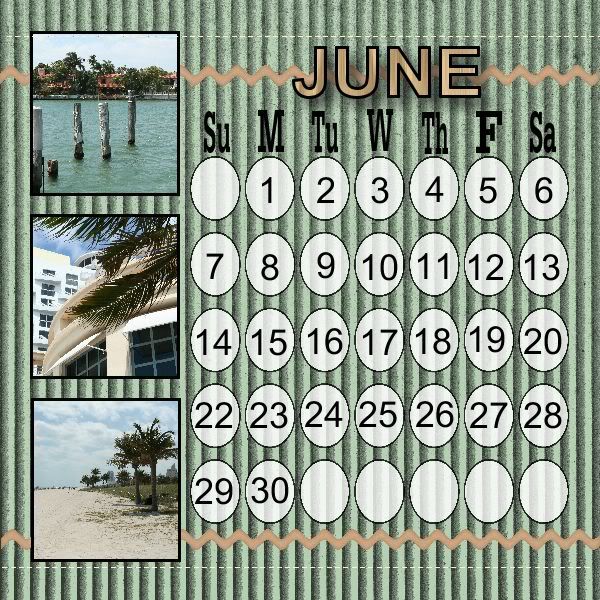
Additional kits are available on the website with a nice selection to fit a wide variety of occasions and themes. Some add-on kits have backgrounds and themes, while others contain monograms and word art. I think I'll be making use of the calendar grids so that I can make my own calendars with ease. I like that there is a collection of kits available for free, or as low as $0.99, with more expensive kits priced up to $9.99. A selection of kits are also available for a discounted price as weekly deals, or you can sign up for the design club, which offers 5 exclusive kit downloads each month for a $5.99 membership fee. Considering a pack of regular scrapbooking paper can be $20, I think the kits are well priced (and of course reusable!) The downloads are also able to be used with Photoshop, or other photo editing software.
Sharing
As well as allowing you print pages, I also enjoy that the pages can be exported as jpegs for easy sharing in digital format. Personally, I like to send a holiday greeting via e-mail - especially to family members overseas. This software allows the addition of music, video, or links into the scrapbook page which almost makes your page an interactive experience! Alternatively, you could create an entire album that can be shared digitally with friends and family.
Best features
For me, the best feature of this software is that everything is customizable so that you're not restricted by layout (as is often the case with online photo book design). Photo layouts can be moved and re-sized to your personal needs; so even if the template has fewer photo openings on a page than you want, it's easy to add more, then move or rotate them as much as you want. Really, the options for what can be done with this are endless so there are no limits to your creativity.
While the software may seem a little intimidating at first, once you have an idea of where everything is, it's really very easy to navigate. I suspect I'll be spending more time exploring everything before I'm completely comfortable, but I know that I'll be putting this software to really good use and I'm excited to create my next photo book using it!
My Memories was kind enough to also provide a copy of the My Memories Suite for me to give away to one of you, so check back tomorrow for giveaway details!
Subscribe to:
Posts
(
Atom
)